Reports and Audit Export
Reporting is where compliance training pays off: clear evidence of who has completed what, ready to hand to an auditor. This is one of the most important tools for an administrator.
Tracking completion
Your dashboard shows completion at a glance — overall progress and key numbers across your organization. Drill into a group or subgroup to see how a specific part of your organization is doing.
Group administrators see the same dashboard for the groups they administer.
Completion Totals
Completion Totals counts course assignments for the period you pick: Today, Yesterday, Week or Month.
| Bar | Counts courses that |
|---|---|
| Not Started | were assigned in the period and are not started |
| Incomplete | were started in the period and are not completed |
| Overdue | became overdue in the period and are still not completed |
| Completed | were completed in the period |
A course becomes overdue the day after its due date.
Click a bar, or its underlined label, to open User Status with matching filters:
| Bar | User Status opens with |
|---|---|
| Not Started | Status Not Started, enrollment dates in the period |
| Incomplete | Status Incomplete, enrollment dates in the period |
| Overdue | Status Overdue, Complete by Date one day before the period |
| Completed | Status Completed, completion dates in the period |
Overview
In Overview, click:
- Assigned courses to open User Status with every assigned course and no filters.
- Overdue to open User Status with every course that is overdue now.
Enrollment and completion reports
Generate reports that list each assigned learner and their status (not started, in progress, completed) along with relevant dates and any due dates. Export these to CSV to share with stakeholders or keep for your records.
Status reports
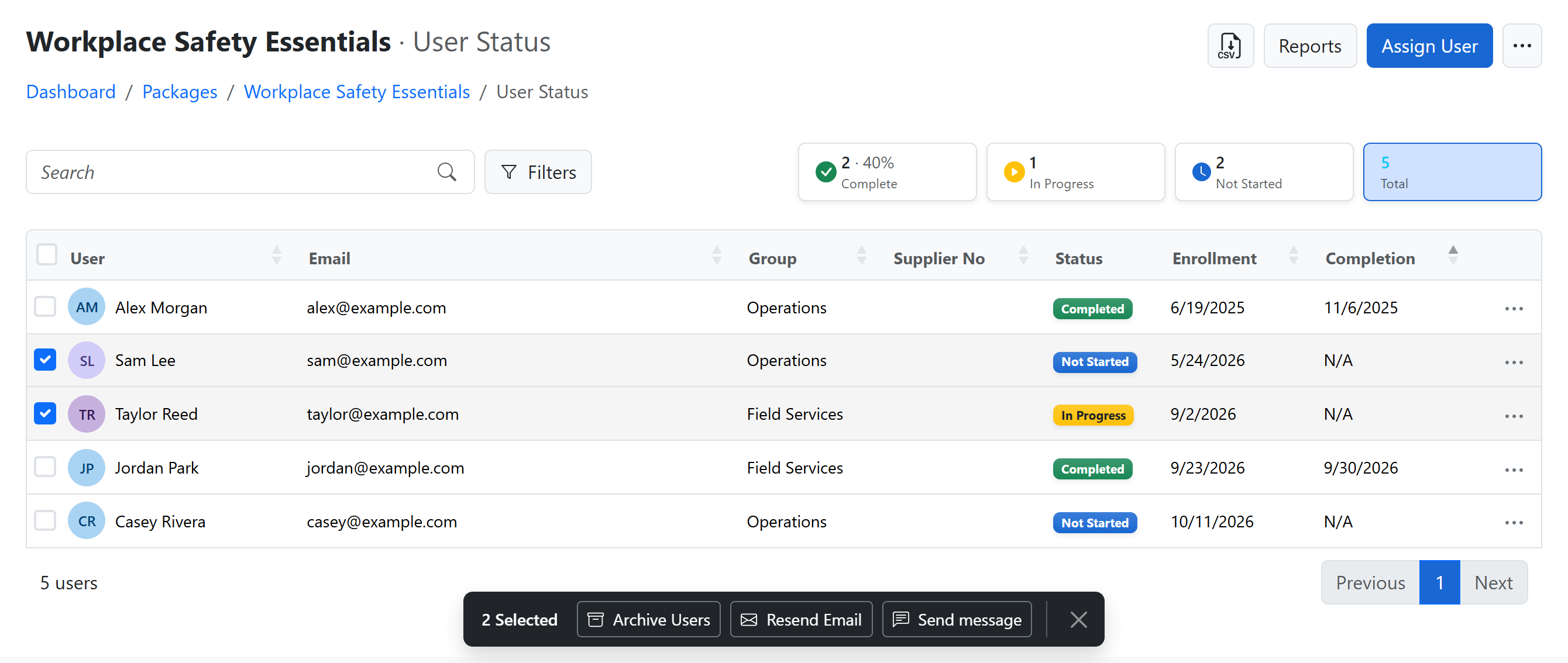
The User Status report for a package lists everyone assigned to it, with their assignment date, completion date, and assignment type. Sort it by email, name, assignment date, or completion date, search it, filter it, and download it as a CSV when you need it outside the platform.
Click Filters to narrow the list:
- Enrollment From / To: courses assigned in those dates.
- Completion From / To: courses completed in those dates.
- Complete by Date / To: courses due in those dates. While this filter is set, a Complete by Date column shows each course's due date. It appears only when the report has due dates.
- Status: Not Started, Incomplete, Completed, Passed or Failed.
You can combine the date filters, for example courses assigned in January and completed in March. Each filter shows as a label above the list. Click its × to remove it, or Clear filters to remove them all.
The cards above the list count each status. Click a card to filter by it, or Overdue to list the courses past their due date.
The CSV button offers two downloads:
- All Users: everyone assigned, whatever the search and filters.
- Current View: only the rows shown, with your search and filters applied.
User Status for all packages
To see every package in one list, open User Status from:
- the dashboard: click a Completion Totals bar, or Assigned courses or Overdue in Overview
- Packages: open the menu next to Reports and select User Status
- Users or My Users: click User Status
Organization administrators see the whole organization. Group administrators, and anyone opening it from My Users, see the groups they administer.
The rows are grouped by course, and the search, filters, cards and row actions work as in a package's User Status. The CSV button offers Current View only. To download everyone in one package, open that package's User Status.
Send message from User Status
Send an email directly from the User Status report:
- One learner: open the … menu at the right of their row and select Send message.
- Several learners: tick their row checkboxes, then click Send message in the action bar at the bottom of the page. Your selection is kept when you move between pages.
You can message up to 300 distinct learners at a time. Selecting several course rows for the same learner sends them only one message.
- Enter a required Subject and write your Message.
- Select Send. The panel shows a Sent count. Replies go to your email address.
Detailed tracking reports
For SCORM courses, detailed tracking reports capture the underlying activity — completion status and timing — so you have a defensible record of training for audits.
Supplier-level tracking report
If you run several groups under the same supplier number — for example, one group per site or project — you can pull a single tracking report that covers every group sharing that supplier number, instead of running each group's report separately.
This is especially useful when people move between a supplier's projects. Because completion is recorded once per learner and course, someone who completed the training under one project still shows as completed in the supplier-level report — so you can demonstrate they were already trained without re-running anything. Anyone genuinely new, or whose training package has since been updated, still shows as outstanding.
To run it, open the Groups list and find any group belonging to the supplier. You can start the report two ways:
- Select the supplier number in that row — it opens a short menu — and choose Tracking Report.
- Or open the row's ⋯ actions menu and choose Tracking Report.
The report downloads as an Excel workbook covering all of that supplier's groups. Each row lists the learner and their status, and any custom fields you've defined — such as a project or region — appear as columns, so you can see which project each person sits under.
Each row shows the group the training was assigned under — not the learner's current group. Someone who has moved therefore appears more than once: once for what they did under their previous group, and once for their current one, so you can see where each piece of training was earned.
You only see groups your report already covers. An organization-wide, package, or course report shows the full history. A report scoped to a single group, or to one supplier number, shows only that scope's own groups — so one supplier is never named in another supplier's report; training done elsewhere simply appears under your own group.
Hover over a row in the Groups list to reveal a copy icon next to the supplier number — a quick way to grab the number for a search or a support request.
Scheduled reports
Rather than running the same report by hand, subscribe to a schedule and have it generated and delivered automatically on the cadence you choose — daily, weekly, or monthly. This keeps stakeholders informed without manual effort.
Adding custom recipients
By default, a scheduled report is only emailed to the administrator who set up the schedule. To also send it to people who don't have an account on the platform — an external stakeholder, an auditor, a shared team inbox — select Add custom recipients next to the schedule and enter their email addresses, separated by a comma or Enter.
Custom recipients get the same report as the administrator, on the same schedule, and each email includes:
- A link to download the report.
- An unsubscribe link that removes only that recipient from the schedule — it doesn't affect the administrator or any other recipient.
The administrator's own unsubscribe link works differently: it turns the schedule off entirely, and no one — including any custom recipients — will receive further reports until it's turned back on.
Custom recipients are a way to keep an external auditor, or shared inbox informed without giving them a login on the platform.
API access
For an external system that needs to pull enrollment and completion data directly, use the read-only Training Records API. API credentials are limited to one organization or group and can be revoked independently of scheduled reports.
Custom field reporting
If you've defined custom fields, you can include them in reports — useful for slicing completion by attributes specific to your organization.
For audit readiness, export a completion report at the end of each training cycle and keep it with your compliance records. It's your proof that the required training was assigned and completed.