Archive Users
Archive a package assignment when a user should no longer appear as actively assigned to that package. Archiving removes the assignment and its courses from active report views; it does not delete the user's account.
Archive one user
- Open the package and select Users.
- Open the action menu on the user's row and select Archive.
- Confirm the archive.
To archive several users from this list, select them and click Archive in the action bar at the bottom of the page.
Archive selected users
Use the package's User Status report when you can identify the users in the table:
- Select up to 100 users with the row checkboxes.
- Click Archive Users in the action bar at the bottom of the page.
- Review and confirm the archive.
Archive users with a CSV
Use Archive With CSV when you have a list of email addresses instead of selecting users in the report. Start it from either location:
- Open the package, select Users, and click Archive With CSV.
- Open the package's User Status report and open the More (…) menu next to Assign User and select Archive With CSV.
Prepare the file
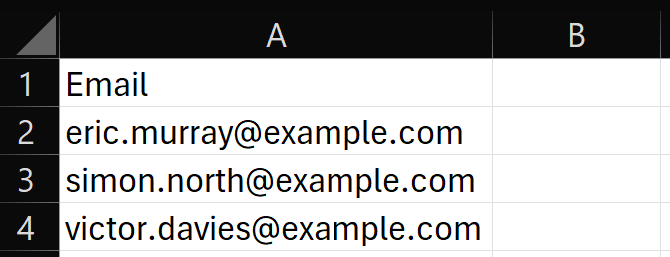
Create a .csv file with a header row, one email address per row, and no more than 1,000 rows. Other columns are ignored.
Name the email column Email or Email Address to have it detected automatically. If it cannot be identified, select the correct column when prompted.
Preview and confirm
- Click Archive With CSV and select the file.
- Select the email column if prompted, then click Continue.
- Review the preview:
| Status | Meaning |
|---|---|
| Archive Users | Active package assignments that will be archived. |
| Already Archived | Assignments that are already archived and will be skipped. |
| Not assigned | Email addresses without an assignment to this package. Select Details to view them. |
| Invalid Email Address | Values that are not valid email addresses. |
| Duplicate | Email addresses listed more than once. Each address is processed only once. |
- If needed, click Download Failed CSV to download the email addresses that are not assigned, invalid, or duplicated, together with their status.
- Click Archive. Only the users counted under Archive Users are changed.
Uploading a file and viewing its preview does not change any assignments. Changes are made only after you click Archive in the confirmation window.